The firm owner told me, a little defensively, that she had already automated everything.
She had QuickBooks with transaction rules, a receipt-capture app, and an AI categorization tool she had purchased in January. Her team was still closing client books a week late every month.
So we traced where the time went.
Transaction coding was mostly under control. The delays came from chasing bank statements, resolving uncategorized transactions, answering client questions, and waiting for reviews because nobody could see what was ready.
She had automated the layer that was already working and left the real bottleneck untouched.
That is the most common bookkeeping automation mistake. Automation is not one function. It operates across several layers, and buying the wrong layer creates another subscription without solving the delay.
This guide organizes the leading tools by what they actually automate, so firms can identify the bottleneck before choosing the software.
What Can Bookkeeping Automation Do in 2026?
Bookkeeping automation is software that reduces manual work across four layers: data capture, transaction categorization and reconciliation, AP/AR and spend, and month-end close and review. Most firms use several layers from different tools rather than relying on one platform.
Automation layer | What it handles | Common tools |
Ledger and categorization | Bank feeds, transaction rules, coding, and reconciliation | QuickBooks Online Accountant, Xero |
Data capture | Receipts, invoices, statements, extraction, and document collection | Dext, Hubdoc |
AI bookkeeping | Coding suggestions, reconciliation support, exceptions, and reporting | Booke AI, Docyt |
AP, AR, and spend | Invoice approvals, bill payments, expenses, cards, and vendor management | BILL, Ramp |
Close and review | Client questions, close checklists, review notes, and cross-client visibility | Double, Xenett |
No single tool is automatically the best choice. The right tool depends on which layer consumes the most time.
Which Type of Bookkeeping Automation Does Your Firm Need First?
Match the software to the bottleneck.
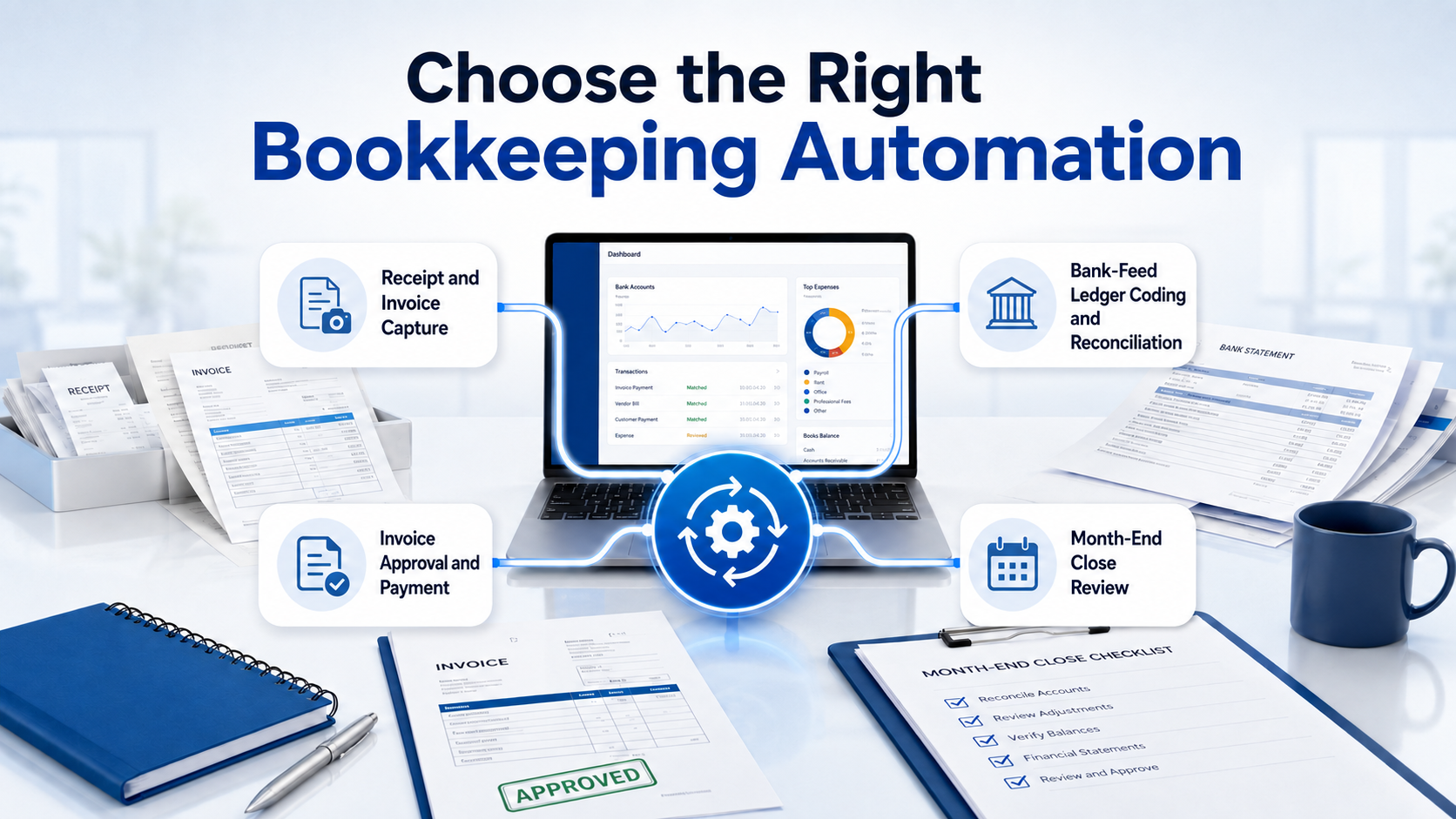
If staff spend hours entering receipts and invoices, begin with data capture. If bank-feed coding and reconciliation create delays, examine ledger rules or AI categorization. If the team loses time chasing approvals and payments, focus on AP and spend management.
If coding is already automated but monthly closes still run late, the remaining problem may be workflow, client communication, exceptions, or review.
Ask four questions before purchasing:
- Where does work wait longest?
- Which manual step occurs across the most clients?
- Is the problem data entry, exceptions, approvals, or review?
- Does the proposed tool replace an existing system or add another one?
Established firms often have some ledger automation already. The less visible opportunity may sit in document collection, client follow-up, and close-and-review workflow.
Automation improves the bookkeeping layer. Firms that also need better workflow, deadline, and client coordination can compare the best practice management software for CPA firms.
What Are the 10 Best Bookkeeping Automation Tools for Accounting Firms?
The leading tools for US accounting, CAS, and bookkeeping firms include QuickBooks Online Accountant, Xero, Dext, Hubdoc, Booke AI, Docyt, BILL, Ramp, Double, and Xenett.
Pricing information reflects publicly available details in August 2026. Plans and features change, so firms should confirm current information before purchasing.
Tool | Layer | What it automates | Best for | Pricing model |
Ledger | Bank feeds, transaction rules, categorization, reconciliation, and multi-client access | US firms managing QuickBooks clients | Accountant access with client-level subscriptions | |
Ledger | Bank feeds, reconciliation suggestions, transaction rules, and multi-currency accounting | Firms wanting a QBO alternative | Client-level monthly plans | |
Data capture | Receipt and invoice capture, extraction, supplier rules, and publishing | Receipt-heavy client books | Partner pricing based on clients and plan | |
Data capture | Document collection, receipt capture, extraction, and cloud filing | Xero-centered firms | Monthly subscription, included in some Xero plans | |
AI bookkeeping | Transaction categorization, reconciliation support, document matching, and client queries | Firms using QuickBooks or Xero | Per-business pricing, firm pricing available | |
AI bookkeeping | Expense accounting, reconciliation, close, bill pay, and reporting | Firms wanting deeper workflow automation | Subscription and firm-specific pricing | |
AP and AR | Invoice entry, approval routing, payments, receivables, and vendor management | Firms managing client payables | Monthly plans plus transaction fees | |
Spend and AP | Corporate cards, expense controls, receipt collection, and bill payments | Firms and clients needing spend control | Free and paid plans | |
Close and review | File review, client questions, close tasks, and bookkeeping workflow | Firms closing recurring QBO or Xero books | Per-client pricing | |
Close and review | Review checks, close workflows, dashboards, and cross-client visibility | CAS firms wanting standardized review | Tiered and custom pricing |
1. QuickBooks Online Accountant
QuickBooks Online Accountant gives firms multi-client access alongside bank feeds, transaction rules, reconciliation tools, and accountant-specific review features.
Watch-out: Rules require proper setup and maintenance. Poor rules can automate incorrect coding just as quickly as correct coding.
2. Xero
Xero provides bank feeds, reconciliation suggestions, transaction rules, multi-currency support, and an extensive connected-app ecosystem.
Watch-out: QuickBooks remains more common among many US small businesses, so firms should assess client adoption and staff familiarity.
3. Dext
Dext captures receipts and invoices, extracts relevant information, applies supplier rules, and publishes data into accounting platforms.
Watch-out: Per-client pricing can become significant across a large book of clients. Firms should identify which clients genuinely need the capture layer.
4. Hubdoc
Hubdoc collects bills, receipts, statements, and other financial documents before syncing them with Xero or QuickBooks Online.
Watch-out: It is more focused on collection and capture than broader expense or close workflow management.
5. Booke AI
Booke AI works with QuickBooks Online and Xero to support transaction coding, reconciliation preparation, document matching, and resolution of uncategorized transactions.
Watch-out: AI suggestions still require review, especially for unusual transactions, new vendors, and inconsistent client activity.
6. Docyt
Docyt combines AI-supported bookkeeping, expense management, reconciliation, bill payment, close automation, and reporting.
Watch-out: Its broader workflow can require more implementation than a focused categorization or capture tool. Firms should confirm fit with their industries and processes.
7. BILL
BILL automates invoice entry, approval routing, vendor payments, receivables, and related AP and AR workflows.
Watch-out: Subscription and transaction charges should be calculated across the complete client volume, not assessed only from the entry plan.
8. Ramp
Ramp combines corporate cards, expense management, spending controls, receipt collection, and accounts payable functions.
Watch-out: Ramp is not a replacement for the general ledger or month-end review process. Eligibility and product availability can also depend on the client.
9. Double
Double, formerly known as Keeper, supports month-end close, automated file review, client questions, task workflows, and recurring bookkeeping processes.
Watch-out: Its strongest fit is with firms managing recurring books in supported accounting systems. Very small client portfolios should assess the total cost carefully.
10. Xenett
Xenett supports bookkeeping review, error detection, close workflows, dashboards, and preparer-reviewer coordination across clients.
Watch-out: Firms should confirm which capabilities are included in each plan because advanced workflow and automation features may require higher tiers or custom pricing.
Reporting tools such as LiveFlow, Fathom, and Syft can add another layer when reporting is the bottleneck. Payroll platforms such as Gusto may also reduce manual work when payroll administration is consuming capacity.
How Do These Tools Fit Together?
Build a stack in layers rather than buying several tools that perform the same job.
Stack layer | Example choice | Purpose |
Ledger base | QuickBooks or Xero | Holds the client’s books |
Data capture | Dext or Hubdoc | Feeds cleaner documents and data into the ledger |
AI assistance | Booke AI or Docyt | Speeds coding, reconciliation, and exception handling |
AP and spend | BILL or Ramp | Controls approvals, payments, expenses, and cards |
Close and review | Double or Xenett | Standardizes completion, review, and client queries |
A firm does not necessarily need one product from every row. Start with the existing ledger and add only the layer that removes a measured bottleneck.
Before adding software, check:
- Whether it integrates with the current ledger
- Which system owns each piece of data
- Whether two tools duplicate the same function
- How exceptions move between systems
- Who maintains rules and integrations
- Whether staff and clients will actually use it
The goal is a connected stack, not a collection of subscriptions.
Does Bookkeeping Automation Replace Bookkeepers?
No. Automation clears routine work, but someone still has to configure the rules, collect missing information, resolve exceptions, review the close, and apply judgment.
A bank rule cannot reliably decide how every unusual payment should be treated. Receipt software cannot force a client to send a missing statement. A close dashboard can show that a reconciliation is incomplete, but it does not complete the reconciliation.
Tools automate the steps. People still run the system.
If automation is working but staffing capacity remains limited, compare the best back-office outsourcing companies for accounting firms before deciding how to expand delivery.
SafeBooks provides remote bookkeeping support for accounting firms through professionals who can work within the firm’s existing software, handle exceptions, complete recurring processes, and support review under the firm’s oversight.
Start With the Bottleneck
The firms getting the most value from automation are not necessarily the firms with the most subscriptions.
They identify where time is being lost, choose a tool for that layer, measure the result, and expand only when the first change works.
Start with one bottleneck. Test the software on real client work. Measure the time saved, exceptions created, review effort, and adoption before adding another layer.
Automation works best when the stack is clear and someone remains responsible for running it.