Best AI Tools for Accounting Firms
Ranked by Workflow
On June 24, 2026, the IRS Office of Professional Responsibility issued Alert 2026-19, outlining how Circular 230 responsibilities apply when tax professionals use generative AI.
The guidance raises an important question for CPA firms adopting new technology: Can an AI tool reduce preparation time while preserving accuracy, confidentiality, and professional accountability?
The answer depends on the workflow.
A bookkeeping team processing thousands of receipts has different requirements from a tax partner researching complex legislation or an auditor reviewing supporting documents.
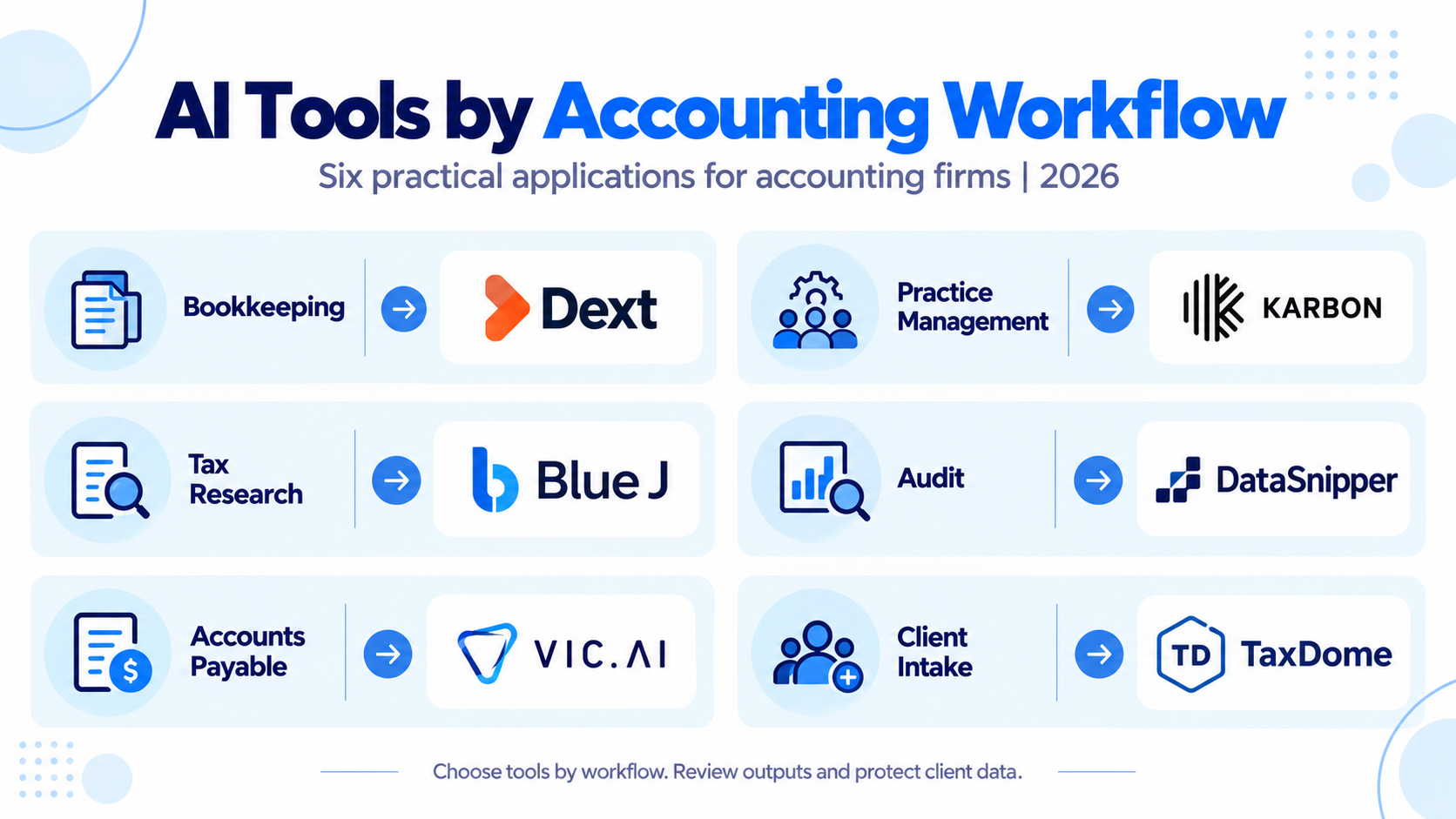
Here are the best AI tools for accounting firms in 2026, organized by the work they perform rather than an arbitrary overall ranking.
What the IRS Says About AI Use in Tax Practice
OPR Alert 2026-19 connects AI use to existing Circular 230 obligations.
CPA firms should pay particular attention to four areas:
- Accuracy: Verify AI-generated calculations, legal authorities, and client advice.
- Confidentiality: Vet third-party AI providers and establish secure information-handling procedures.
- Training: Ensure staff understand approved tools, limitations, and appropriate review requirements.
- Billing: AI-related efficiency gains must be reflected fairly in billing. Charging for manual work that was not performed or double-billing AI-assisted work can raise concerns under Circular 230.
The guidance also emphasizes documenting firm policies and maintaining professional oversight.
This makes vendor evaluation a compliance decision, not simply a software purchasing decision.
Best AI Tools for Accounting Firms: Quick Comparison
Tool | Best accounting workflow | Pricing model |
Dext AI Assist | Bookkeeping automation | Subscription plus AI add-on |
Karbon AI | Practice management | Per-user subscription |
Blue J | Tax research | Subscription; confirm current quote |
DataSnipper | Audit evidence review | Custom quote |
Vic.ai | High-volume accounts payable | Enterprise quotation |
TaxDome | Client intake and tax workflows | Per-user subscription |
Selections are based on published capabilities and workflow suitability, not independent product testing.
Which AI Tool Fits Each Accounting Workflow?
Dext AI Assist: Bookkeeping Automation
Dext AI Assist learns from existing bookkeeping decisions and suggests recurring transaction classifications, field updates, and related automations.
It is particularly relevant to firms processing substantial receipt and invoice volumes.
Consideration: Its AI Assist capabilities focus on supported Dext workflows, particularly Costs and Sales, rather than replacing complete bookkeeping systems.
Karbon AI: Practice Management
Karbon provides AI-assisted email summaries, drafting support, and workflow-related features within its practice management environment.
It suits firms coordinating recurring engagements across multiple accountants.
Consideration: Firms should evaluate migration effort and compatibility with their existing practice management tools.
Blue J: Tax Research
Blue J supports AI-assisted tax research using legal and regulatory sources.
It can help professionals identify relevant authorities and organize complex research questions.
Consideration: Researchers must verify citations, effective dates, and the applicability of authorities before relying on an AI-generated conclusion.
DataSnipper: Audit Evidence Automation
DataSnipper works within Excel to extract, match, and cross-reference audit documentation.
Its capabilities help auditors connect financial information with supporting invoices, contracts, and statements.
Consideration: Certain advanced extraction functions and client-document collection features require additional packages or modules.
Vic.ai: Accounts Payable Automation
Vic.ai focuses on invoice processing, coding, and approval automation.
Its capabilities are relevant to accounting teams managing substantial AP volumes.
Consideration: Enterprise implementation requirements may make it less practical for smaller firms with limited invoice activity.
TaxDome: Client Intake and Workflow Management
TaxDome combines document management, client portals, workflow automation, and practice administration.
Its AI-related capabilities should be evaluated alongside its established non-AI automation features.
Consideration: Firms should confirm which AI functions are currently included in their chosen plan rather than relying on product announcements.
For more options, see Accounting Practice Management Software for CPA Firms.
What About ChatGPT, Microsoft Copilot, and Built-In AI?
General-purpose assistants such as ChatGPT, Microsoft Copilot, and Claude can help draft communications, summarize approved documents, and organize internal procedures.
Firms should also assess AI already available in QuickBooks, Xero, CCH Axcess, and Thomson Reuters products before purchasing additional software.
However, public AI accounts should not receive confidential taxpayer information without appropriate security, authorization, and compliance review.
Enterprise controls, retention policies, data-processing terms, and permissions should be evaluated before deployment.
How to Calculate AI Automation ROI
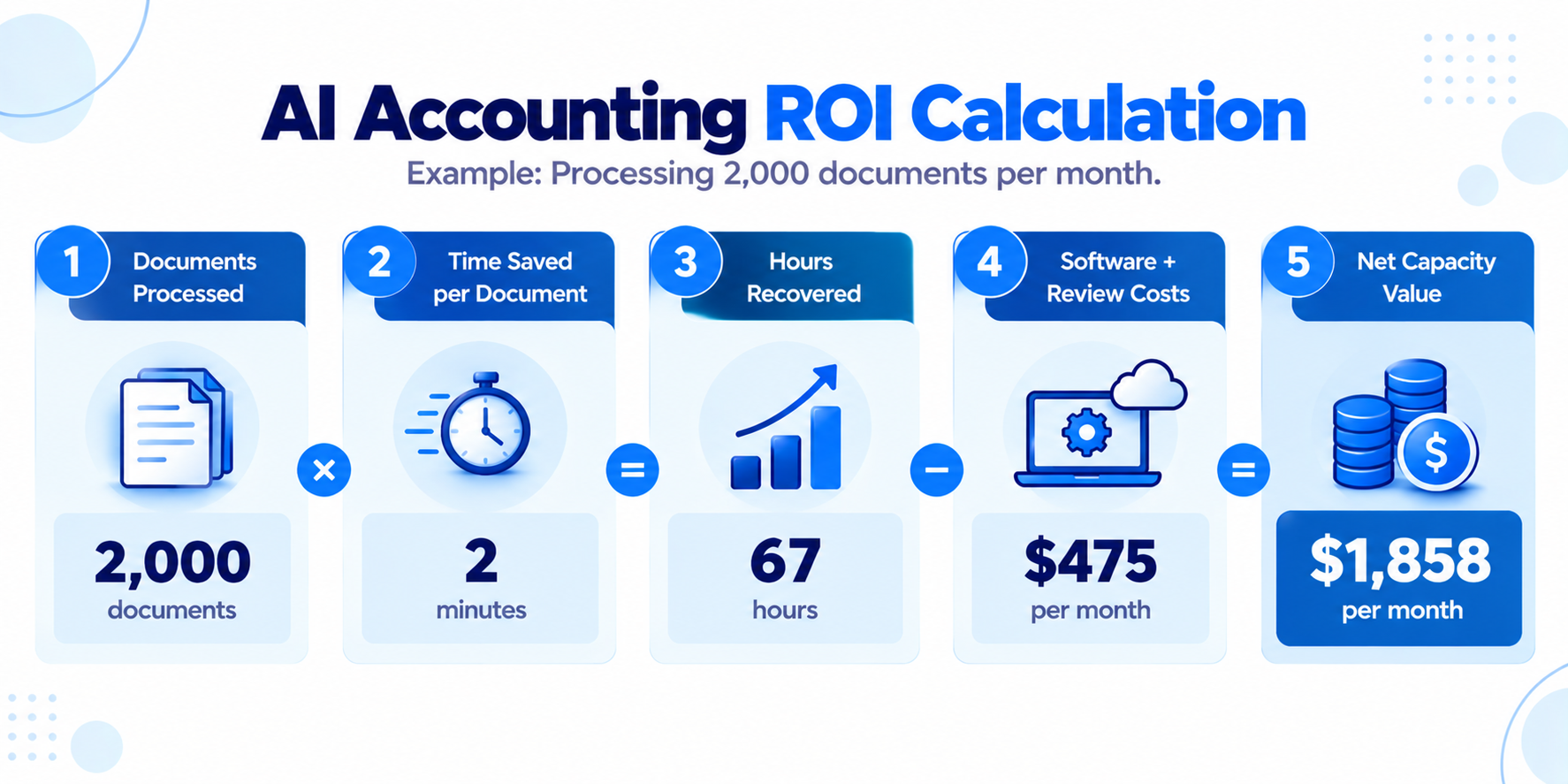
Consider a CPA bookkeeping team processing 2,000 documents monthly.
If AI reduces handling time by two minutes per document, the firm could recover approximately 67 hours.
At an illustrative labor cost of $35 per hour:
Monthly calculation | Amount |
Gross labor capacity recovered | $2,333 |
Software subscription (assumed) | ($300) |
Additional review: 5 hours at $35 | ($175) |
Illustrative net capacity value | $1,858 |
The $300 software expense is a hypothetical budgeting assumption, not a vendor quotation.
Recovered hours only create financial value when the firm can reduce costs or redirect that capacity to productive work.
How SafeBooks Supports Controlled AI Accounting Workflows
AI adoption becomes more complex when offshore professionals access accounting systems containing client information.
Consider a CPA firm using automated invoice extraction across 30 bookkeeping clients.
An offshore accounting professional may review extracted data, reconcile transactions, and investigate exceptions, but access to client information and AI systems should follow documented permissions.
Before implementation, firms should confirm vendor data-processing arrangements, staff training, confidentiality safeguards, and review responsibilities.
SafeBooks Global provides offshore bookkeeping and accounting support and tax preparation support within established client workflows.
CPA firms retain responsibility for appropriate oversight, professional judgments, and compliance.
Final Takeaway
The best AI tool is the one that improves a defined accounting workflow without introducing unacceptable review or security risks.
Before the next busy season, select one repetitive process, run a controlled 30-day pilot, and measure net savings alongside accuracy and review time.
Contact SafeBooks Global to discuss offshore accounting support for your firm’s technology-enabled workflows.